Send Richard a voice mail message

Thursday, September 2, 2010

What is SCAMPER and How Can it Be Used in a Judaic Studies Blended Learning Classroom? Part Two

When mentoring our pre-service and in-service teachers we need to describe and model both research-based and clinically tested best practices, and demonstrate how these best practices can be applied in the real (i.e. physical) and virtual (online) classroom for both teaching and teacher training, The combination of face to face instruction in a physical setting and online learning is called blended learning. In this section of the blog we will describe how the internet can serve as a supplemental resource for instruction and the mentoring of pre-service and in-service Jewish educators. In this post we will discuss how the creative thinking tool, SCAMPER, can be used in a Judaic Studies blended learning classroom. This is the first part of a two- part post. The second part of this lesson plan idea follows.

Assumption: The teacher or mentor teacher has a interactive white board (i.e. SMART Board, Promethean, etc.), a Tablet PC (also called a Slate or Blade), a computer presenter or computer with internet access attached to an LCD projector in the classroom. It would be ideal if students or mentees had access to their own laptop computers as well.

Note: Although this lesson plan idea is designed for the Judaic Studies classroom, it can be also be used for training pre-service and in-service Jewish educators for professional or staff development. It is our hope that Jewish educators around the globe will form an online community of practice, a CoP, a group of people who share an interest, a craft, and/or a profession, to enhance the delivery of instruction and training of Jewish educators.

Note: Any of these collaborative writing web 2.0 tools can be used with this lesson plan idea.

Step Four: The students/mentees work in small groups online in the physical or the virtual classroom to work on the attribute-listing challenge. See the Judaic Studies content examples listed at the top of this post.

Note: This activity can also be used as a face to face classroom learning activity without adding the online component.

Step Five: When the task is completed each group emails its finished product to the teacher/mentor and the members of the class, or posts it on the school’s website.

On the next post we will explore another creative problem solving tool, Morphological Matrix.


Wednesday, September 1, 2010

What is SCAMPER and How Can it Be Used in the Judaic Blended Learning Classroom? Part One


When mentoring our pre-service and in-service teachers we need to describe and model both research-based and clinically tested best practices, and demonstrate how these best practices can be applied in the real (i.e. physical) and virtual (online) classroom for both teaching and teacher training, The combination of face to face instruction in a physical setting and online learning is called blended learning. In this section of the blog we will describe how the internet can serve as a supplemental resource for instruction and the mentoring of pre-service and in-service Jewish educators. In this post we will discuss how the creative thinking tool, SCAMPER, can be used in a Judaic Studies blended learning classroom. This is the first part of a two-part post.

Assumption: The teacher or mentor teacher has a interactive white board (i.e. SMART Board, Promethean, etc.), a Tablet PC (also called a Slate or Blade), a computer presenter or computer with internet access attached to an LCD projector in the classroom. It would be ideal if students or mentees had access to their own laptop computers as well.

Note: Although this lesson plan idea is designed for the Judaic Studies classroom, it can be also be used for training pre-service and in-service Jewish educators for professional or staff development. It is our hope that Jewish educators around the globe will form an online community of practice, a CoP, a group of people who share an interest, a craft, and/or a profession, to enhance the delivery of instruction and training of Jewish educators.

Note: Any of these collaborative writing web 2.0 tools can be used with this lesson plan idea.

What is SCAMPER?

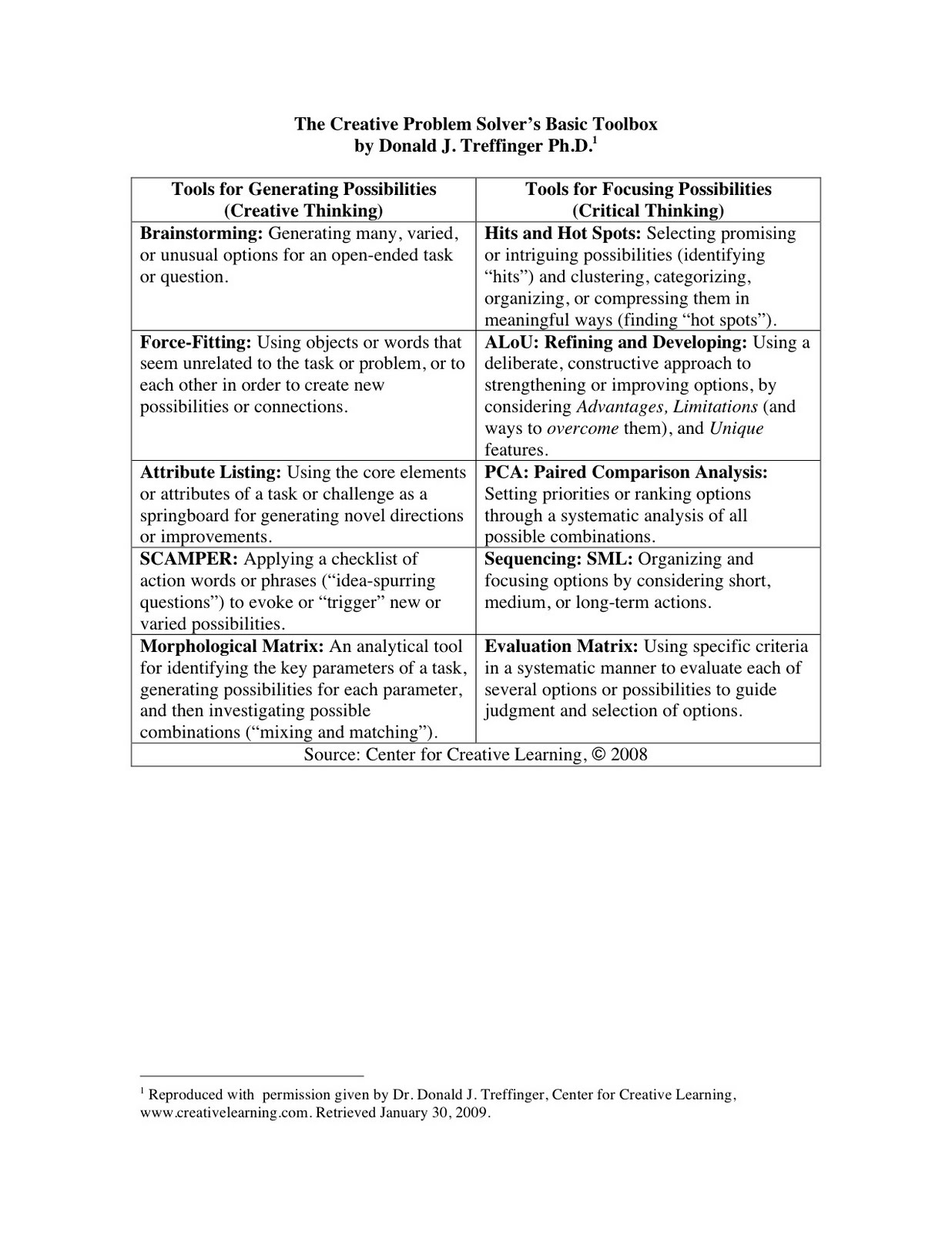
SCAMPER is an acronym. It is a checklist of action words or phrases (“idea-spurring questions”) to evoke or “trigger” new or varied possibilities. Here is the key to the SCAMPER acronym:

S - Substitute - components, materials, people

C - Combine - mix, combine with other assemblies or services, integrate

A - Adapt - alter, change function, use part of another element

M - Magnify, Minimize or Modify - increase or reduce in scale, change shape, modify attributes (e.g. color)

P - Put to another use -apply in new way

E - Eliminate - remove elements, simplify, reduce to core functionality

R - Reverse - turn inside out or upside down.

See the example in this slideshare presentation.

For elaboration on SCAMPER and other creative and critical thinking tools read the books of Dr. Treffinger and his associates.

How can SCAMPER be used in a Judaic Studies blended learning classroom?

As a reminder, a blended learning classroom is one that combines the face-to face physical and the online or virtual classroom.

Here are some suggested steps a teacher or mentor can implement to show Jewish students/mentees how to use SCAMPER for creative problem solving.

Step One: The teacher/mentor explains SCAMPER.

Step Two: The teacher/mentor places students into learning pairs, triads or quads.

In the next post we will share the second part of this lesson plan idea on how to empower students/mentees to use SCAMPER in a Judaic Studies blended learning classroom.

Tuesday, August 31, 2010

What is Attribute Listing and How Can it Be Used in a Judaic Studies Blended Learning Classroom? Part Two

When mentoring our pre-service and in-service teachers we need to describe and model both research-based and clinically tested best practices, and demonstrate how these best practices can be applied in the real (i.e. physical) and virtual (online) classroom for both teaching and teacher training, The combination of face to face instruction in a physical setting and online learning is called blended learning. In this section of the blog we will describe how the internet can serve as a supplemental resource for instruction and the mentoring of pre-service and in-service Jewish educators. In this post we will discuss how the creative thinking tool, attribute listing, can be used in a Judaic Studies blended learning classroom. This is the first part of a two- part post. The second part of this lesson plan idea follows.

Assumption: The teacher or mentor teacher has a interactive white board (i.e. SMART Board, Promethean, etc.), a Tablet PC (also called a Slate or Blade), a computer presenter or computer with internet access attached to an LCD projector in the classroom. It would be ideal if students or mentees had access to their own laptop computers as well.

Note: Although this lesson plan idea is designed for the Judaic Studies classroom, it can be also be used for training pre-service and in-service Jewish educators for professional or staff development. It is our hope that Jewish educators around the globe will form an online community of practice, a CoP, a group of people who share an interest, a craft, and/or a profession, to enhance the delivery of instruction and training of Jewish educators.

Note: Any of these collaborative writing web 2.0 tools can be used with this lesson plan idea.

Step Four: The students/mentees work in small groups online in the physical or the virtual classroom to work on the attribute-listing challenge. See the sample of suggested learning activities at the top of this post.


Note: This activity can also be used as a face to face classroom learning activity without adding the online component.

Step Five: When the task is completed each group emails its finished product to the teacher/mentor and the members of the class, or posts it on the school’s website.

On the next post we will explore another creative problem solving tool, SCAMPER.


Monday, August 30, 2010

What is Attribute Listing and How Can it Be Used in a Judaic StudiesBlended Learning Classroom? Part One


When mentoring our pre-service and in-service teachers we need to describe and model both research-based and clinically tested best practices, and demonstrate how these best practices can be applied in the real (i.e. physical) and virtual (online) classroom for both teaching and teacher training, The combination of face to face instruction in a physical setting and online learning is called blended learning. In this section of the blog we will describe how the internet can serve as a supplemental resource for instruction and the mentoring of pre-service and in-service Jewish educators. In this post we will discuss how the creative thinking tool, attribute listing, can be used in a Judaic Studies blended learning classroom. This is the first part of a two- part post.

Assumption: The teacher or mentor teacher has a interactive white board (i.e. SMART Board, Promethean, etc.), a Tablet PC (also called a Slate or Blade), a computer presenter or computer with internet access attached to an LCD projector in the classroom. It would be ideal if students or mentees had access to their own laptop computers as well.

Note: Although this lesson plan idea is designed for the Judaic Studies classroom, it can be also be used for training pre-service and in-service Jewish educators for professional or staff development. It is our hope that Jewish educators around the globe will form an online community of practice, a CoP, a group of people who share an interest, a craft, and/or a profession, to enhance the delivery of instruction and training of Jewish educators.

Note: Any of these collaborative writing web 2.0 tools can be used with this lesson plan idea.

What is Attribute-Listing?

Attribute-Listing is applying the core elements or attributes of a task or challenge as a springboard for generating novel directions or improvements. See the example in this slideshare presentation.

For elaboration on Attribute Listing and other creative and critical thinking tools read the books of Dr. Treffinger and his associates.

How can attribute-listing be used in a Judaic Studies blended learning classroom?

As a reminder, a blended learning classroom is one that combines the face-to face physical and the online or virtual classroom.

Here are some suggested steps a teacher or mentor can implement to show Jewish students/mentees how to use attribute-listing for creative problem solving.

Step One: The teacher/mentor explains attribute-listing.

Step Two: The teacher/mentor places students into learning pairs, triads or quads.

In the next post we will share the second part of this lesson plan idea on how to empower students/mentees to use attribute in a Judaic Studies blended learning classroom.

Friday, August 27, 2010

What is Force-Fitting and How Can it Be Used in a Judaic Studies Blended Learning Classroom? Part Two


When mentoring our pre-service and in-service teachers we need to describe and model both research-based and clinically tested best practices, and demonstrate how these best practices can be applied in the real (i.e. physical) and virtual (online) classroom for both teaching and teacher training, The combination of face to face instruction in a physical setting and online learning is called blended learning. In this section of the blog we will describe how the internet can serve as a supplemental resource for instruction and the mentoring of pre-service and in-service Jewish educators. In this post we will discuss how the creative thinking tool, force-fitting, can be used in a Judaic Studies blended learning classroom. This is the first part of a two-part post. Part two of this lesson plan idea follow.


Assumption: The teacher or mentor teacher has a interactive white board (i.e. SMART Board, Promethean, etc.), a Tablet PC (also called a Slate or Blade), a computer presenter or computer with internet access attached to an LCD projector in the classroom. It would be ideal if students or mentees had access to their own laptop computers as well.

Note: Although this lesson plan idea is designed for the Judaic Studies classroom, it can be also be used for training pre-service and in-service Jewish educators for professional or staff development. It is our hope that Jewish educators around the globe will form an online community of practice, a CoP, a group of people who share an interest, a craft, and/or a profession, to enhance the delivery of instruction and training of Jewish educators.

Note: Any of these collaborative writing web 2.0 tools can be used with this lesson plan idea.

Step Three: The teacher/mentor presents his or students/mentees with an interesting challenge related to the course content of a Judaic Studies class. See the examples listed at the top of this post.


Step Four: The students/mentees work in small groups online in the physical or the virtual classroom to work on the force-fitting challenge.

Note: This activity can also be used as a face to face classroom learning activity without adding the online component.

Step Five: When the task is completed each group emails its finished product to the teacher and the members of the class, or posts it on the school's website.

On the next post we will explore another creative problem solving tool, attribute listing.

Thursday, August 26, 2010

What is Force-Fitting and How Can it Be Used in a Judaic Studies Blended Learning Classroom? Part One


When mentoring our pre-service and in-service teachers we need to describe and model both research-based and clinically tested best practices, and demonstrate how these best practices can be applied in the real (i.e. physical) and virtual (online) classroom for both teaching and teacher training, The combination of face to face instruction in a physical setting and online learning is called blended learning. In this section of the blog we will describe how the internet can serve as a supplemental resource for instruction and the mentoring of pre-service and in-service Jewish educators. In this post we will discuss how the creative thinking tool, force-fitting, can be used in a Judaic Studies blended learning classroom. This is the first part of a two-part post.

Assumption: The teacher or mentor teacher has a interactive white board (i.e. SMART Board, Promethean, etc.), a Tablet PC (also called a Slate or Blade), a computer presenter or computer with internet access attached to an LCD projector in the classroom. It would be ideal if students or mentees had access to their own laptop computers as well.

Note: Although this lesson plan idea is designed for the Judaic Studies classroom, it can be also be used for training pre-service and in-service Jewish educators for professional or staff development. It is our hope that Jewish educators around the globe will form an online community of practice, a CoP, a group of people who share an interest, a craft, and/or a profession, to enhance the delivery of instruction and training of Jewish educators.

Note: Any of these collaborative writing web 2.0 tools can be used with this lesson plan idea.


How can force-fitting be used in a Judaic Studies blended learning classroom?

As a reminder, a blended learning classroom is one that combines the face-to face physical and the online or virtual classroom.

Here are some suggested steps a teacher or mentor can implement to show Jewish students/mentees how to use force-fitting for creative problem solving.

Step One: The teacher/mentor explains force-fitting.

Step Two: The teacher/mentor places students into learning pairs, triads or quads.

In the next post we will share the second part of this lesson plan idea on how to empower students/mentees to use force-fitting in a Judaic Studies blended learning classroom.

Wednesday, August 25, 2010

Who is Dr. Donald J. Treffinger?


Dr. Donald J. Treffinger is the President and Director of the Center for Creative Learning, Sarasota, Florida,
http://www.creativelearning.com/ and he and his colleagues have created a set of teacher-friendly creative and critical thinking tools that can be used for instruction and teacher training. You can see those creative and critical thinking tools at the top of this post. Dr. Treffinger has granted us permission to share these thinking tools in our blog. These thinking tools can be used in both face to face and virtual classrooms. When you combine face to face and virtual (online) learning it is called blended or hybrid learning.

In the next post we will share how the creative thinking tool, Force-Fitting, can be used by students and mentees in a blended learning classroom.

Jewish Education News Blog

Richard D. Solomon's Blog on Mentoring Jewish Students and Teachers

http://nextleveljewisheducation.blogspot.com/